Group Policies
Note
Machine translation from the German version. In case of doubt, the content of the German version shall prevail.
Create GPOs
Group policies can only be created by domain administrators. If you want to create new group policies for your OU, you must request them informally via the IT.S Helpdesk. This request should be submitted by the OU administrator and include the following information:
- For which OUs do you want new GPOs?
- How many GPOs would you like?
Editing GPOs
Requirements to be able to edit Group Policies.
A domain-joined workstation (preferably a dedicated admin workstation) Open Group Policy Management as RUB_$OU_$loginid
When you expand the tree under ruhr-uni-bochum.de, you will find the "Group Policy Objects" folder. In this folder, all GPOs of the domain are sorted alphabetically. Your new GPOs follow the naming scheme RUB_$OU_GPO_X
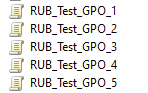
At this point, you can edit your new GPO. Changing the name is recommended. The prefix RUB_$OU_ must be retained.
Link GPOs via GUI
Requirements to link Group Policies:
A domain-joined workstation (preferably a dedicated admin workstation) Open Group Policy Management as RUB_$OU_$loginid
Navigate in the Group Policy Management Tool via the structure tree to the location in your OU where you want to link the appropriate GPO. The option should appear via right-click.
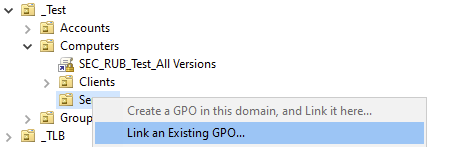
If the option is grayed out, you do not have the rights to link a GPO at this point. Please note that as RUB_$OU_$loginid, you only have rights to link within your own OU.
Link GPOs via PowerShell
Requirements to link Group Policies:
A domain-joined workstation (preferably a dedicated admin workstation) Open PowerShell as RUB_$OU_$loginid You need to adjust the variables $GpoName and $TargetOU beforehand for your specific use case.
PowerShell
# Variablen:
$GpoName = "Meine GPO"
$TargetOU = "OU=Clients,OU=Computers,OU=_Test,OU=_RUB Systeme,DC=ruhr-uni-bochum,DC=de"

Import-Module GroupPolicy

try {
    New-GPLink -Name $GpoName -Target $TargetOU -LinkEnabled Yes -ErrorAction Stop
    Write-Host "GPO '$GpoName' erfolgreich mit '$TargetOU' verlinkt." -ForegroundColor Green
}
catch {
    Write-Host "Fehler beim Verlinken der GPO: $($_.Exception.Message)" -ForegroundColor Red
}
Delete GPOs
GPOs can only be deleted by Domain Admins. To do this, remove all links of the GPO and rename the GPO to "Delete". The GPO will then be deleted by the Domain Admin at the next opportunity.