What is DNS?
Note
Machine translation from the German version. In case of doubt, the content of the German version shall prevail.
DNS stands for Domain Name System – and is like the internet's phonebook. It ensures you can remember names like www.ruhr-uni-bochum.de instead of cryptic number sequences. Without DNS, practically nothing would work on the internet: no browsing, no email, no video streaming.
What is DNS used for?
Computers on the internet are not reached by names, but via IP addresses – sequences of numbers like 134.147.64.10. This is the "phone number" of a server.
People have a hard time remembering number sequences. That's why we have names like www.ruhr-uni-bochum.de – and DNS translates between both worlds.
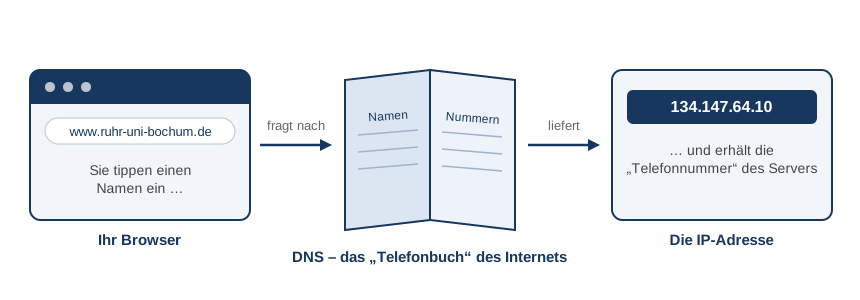
Every time you visit a website, send an email, or an app connects your phone to a service, a DNS query happens in the background first: "Which IP address belongs to this name?" Only with this answer does your device know where to connect.
A DNS query usually takes only a few milliseconds – you won't notice anything.
How does a DNS query work?
No single computer in the world knows all internet addresses – there are far too many, and they change constantly. Instead, the knowledge is distributed: many servers each know only their own area and otherwise forward requests.
The DNS resolver takes on the role of mediator – a kind of information service that your computer automatically queries (at RUB, these are the nameservers from IT.SERVICES, at home usually those of your internet provider). The resolver then sequentially checks the responsible servers.
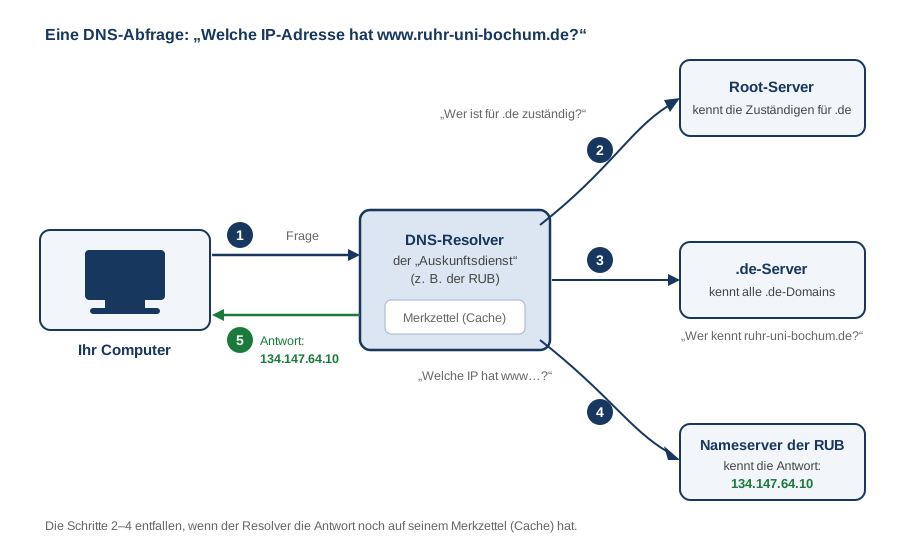
The following happens in detail:
- Your computer asks the resolver: "What is the IP address of
www.ruhr-uni-bochum.de?" - The resolver queries a root server ("root" of the system). The root server does not know the answer itself but knows who is responsible for the
.dedomain. - The resolver asks the
.deserver. It also doesn't know the IP address but knows which nameserver manages the domainruhr-uni-bochum.de. - The resolver queries the RUB nameserver. The nameserver knows the answer:
134.147.64.10. - The response is returning to your computer – and your browser can establish the connection to the website.
That sounds like many steps, but it works in the blink of an eye – also because the resolver notes answers on a cheat sheet (cache). If someone asks shortly after for the same name, it answers immediately from memory without querying all stations again.
Everyday comparison: You're looking for "Ms. Müller from accounting." The central information desk (Resolver) first asks the switchboard (Root): "Who is responsible for administration?", then the administration's secretariat (
.deserver): "Where is the accounting department?", and finally the accounting department itself (RUB's nameserver), which knows the extension. On the next call, the information desk already knows the number by heart.
How are the names structured?
Internet names (domains) are organized hierarchically – like a tree read from right to left:
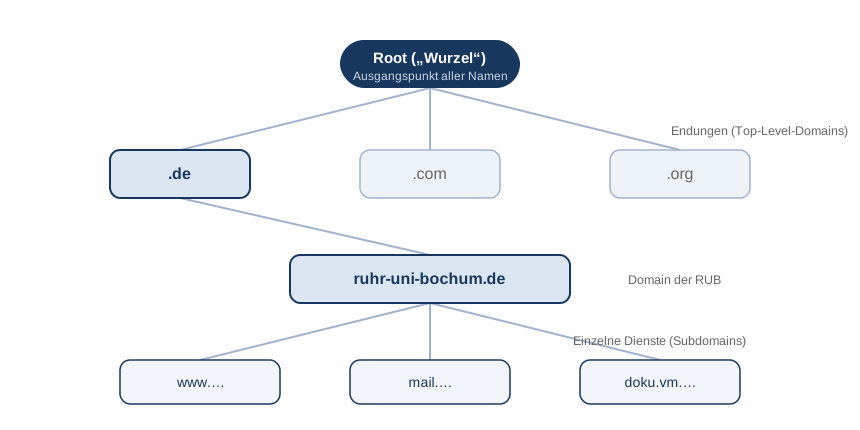
At the example of www.ruhr-uni-bochum.de
- .de – the top-level domain (TLD) for Germany.
ruhr-uni-bochum– the domain of Ruhr University Bochum.www– a single service (subdomain) within the domain, here the web server.
The key to this division: Each party only manages its own area. RUB can decide for itself which names exist below ruhr-uni-bochum.de—without having to ask anywhere centrally. That’s exactly why DNS works worldwide with billions of entries.
Key terms at a glance
| Concept | Simply explained |
|---|---|
| IP address | The "phone number" of a device on the network, e.g., 134.147.64.10 (IPv4) or 2a05:3e00:1:1002::64:10 (the longer, newer IPv6 format). |
| Domain | A domain name on the internet, e.g. ruhr-uni-bochum.de. |
| Name server | A server that knows the entries of a domain and provides information. |
| Resolve | The "information service" that queries the appropriate name servers for your computer. |
| Cache | The "saved list": previously known answers are temporarily stored for a while. |
| A-Record | A DNS record that maps a name to an IPv4 address (A) or an IPv6 address (AAAA). |
| CNAME (Alias) | Nickname referring to another name |
| MX Record | Tell which server accepts the emails of a domain. |
And at the RUB?
IT.SERVICES operates the name servers and resolvers of Ruhr University and manages the domain ruhr-uni-bochum.de.
- You manage your own DNS entries (e.g., for a new server at the chair) using IPControl – see IP management with IPControl.
- How to make DNS queries encrypted is shown on the page DNS Encryption (DoT / DoH).
- Useful tools for looking up DNS entries can be found under Tools.
- For questions about domains and DNS records, hostmaster@ruhr-uni-bochum.de can help.